


I like shopping apps most when they reduce the small decisions that make a grocery trip tiring: remembering what is running out, checking which offers matter, and finding the right store before leaving home. Fred Meyer, the shopping app from The Kroger Co., is built around that practical routine. It brings coupons, advertisements, rewards, store-finding tools, and a shopping list into one place instead of making me switch between separate notes and promotional pages.
After spending time with it, I see Fred Meyer as a useful companion for shoppers who already visit Fred Meyer stores and want a more organized way to prepare. It is free, rated for Everyone, and available for devices running Android 8.0 or later. Its average rating is 3.9, based on around 41 thousand ratings, while more than a million people have installed it. Those figures suggest a well-established app, although the rating also hints that the experience may not be equally smooth for everyone.
How Fred Meyer fits into an ordinary shopping trip
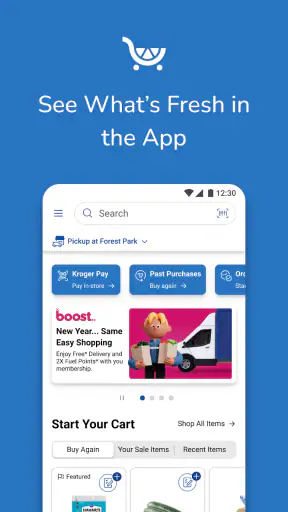
The app’s main strength is not one flashy tool. It is the way several ordinary shopping tasks sit together. I can think about a planned trip, browse the current advertising, save useful coupons, check rewards-related savings, and build a list without leaving the same shopping environment. That makes more sense to me than using a generic notes app for products and then opening a separate page to look for discounts.
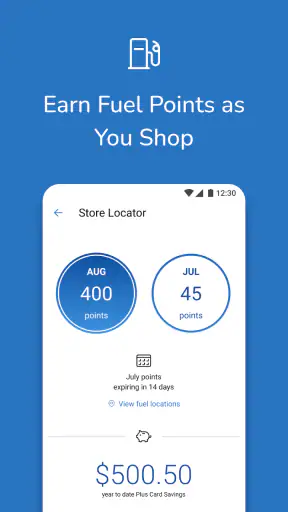
The store-finding function is particularly helpful when I am away from my usual neighborhood or trying to decide where to shop after work. Instead of relying on memory, I can use the app to locate a Fred Meyer store and then organize the rest of the trip around that choice. It is a small feature, but it matters when the nearest location is not obvious or when I am already planning several errands.
The shopping list is also more valuable than it first appears. A list turns the app from a passive place to browse offers into something I can actively use while walking through the store. I prefer adding items before I leave, then checking the list as I go rather than trying to remember every household need from memory. This is especially useful for recurring purchases such as breakfast supplies, cleaning products, and pet items.
One practical habit is to review the advertising before building the final list. That order helps me notice whether a product I already need has a relevant offer, while also limiting the temptation to add random items simply because they look discounted. The app works best when I use promotions to support a plan, not when the promotions become the plan.
What feels quick and what may slow the routine
For basic tasks, my expectation is that Fred Meyer should feel reasonably direct: open the app, move to the shopping list, check available offers, or find a store. Because the app combines several shopping functions, the experience naturally involves more screens than a simple notes application. That trade-off is acceptable when I need store-specific information, but it means the app is not the fastest possible tool for writing down three items.
The current release is version 97.2, which shows that this is a mature product rather than a newly assembled companion app. Maturity can help with a familiar layout and established workflows, but it can also mean that the app carries more parts than a minimalist shopper needs. My advice is to use the list as the central starting point and treat the promotional areas as supporting tools. That keeps the routine focused.
Speed also depends on what I am doing. Checking a short list is a lighter task than moving between store information, advertising, coupons, and rewards content during a busy trip. If I am standing in a crowded aisle with one hand on a basket and the other holding my phone, every extra transition feels more noticeable. Preparing at home reduces that friction and makes the in-store portion much simpler.
A useful workflow is to prepare in two passes. First, I make a normal list based on what the household actually needs. Then I look for savings and adjust the list only when the offer matches a planned purchase. This approach avoids the common problem of spending more time browsing deals than shopping. It also makes the app feel faster because I am not asking it to solve the entire trip while I am already inside the store.
Using it during a large or complicated shop
Fred Meyer becomes more useful when the shopping trip has several moving parts. A small convenience run may not justify opening a full store app, but a weekly shop can benefit from having the list, store details, and savings tools together. I can prepare a longer list in advance, use the advertising to prioritize certain purchases, and keep the phone available for checking what remains.
Heavy use is where organization matters more than raw speed. A long list can become difficult if items are entered in a random order, so I recommend grouping it mentally or by the way I move through the store. For example, I might add produce, pantry goods, refrigerated items, household supplies, and personal-care products in separate blocks. Even if the app does not replace a carefully planned route, this structure reduces the need to scan the entire list repeatedly.
Another non-obvious trade-off is that promotional browsing can create decision fatigue. Seeing many possible savings is not always the same as saving money. I get better results when I decide a spending limit and a list of essentials first. The app is then a filter for relevant offers rather than a stream of reasons to buy something extra.
For a family shop, the list can also act as a shared memory aid, even if only one person is carrying the phone. Before leaving, I can check the list against the kitchen and storage areas, removing items that are already available and adding quantities that are genuinely needed. That preparation is more important than any individual coupon because it prevents duplicate purchases and forgotten basics.
When my connection or attention is limited, I would rather have the important list ready before entering the store. That is a sensible precaution for any shopping app that depends on current store and savings content. The app is most dependable as a prepared shopping companion, not as something I expect to configure from scratch while moving through a crowded shop.
Coupons, advertising, and rewards without losing control
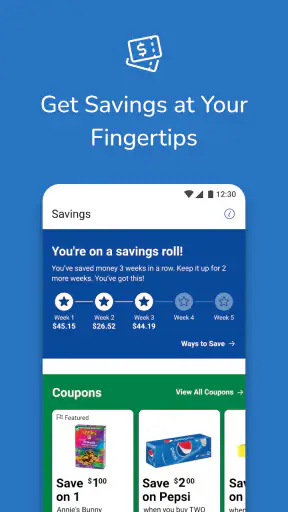
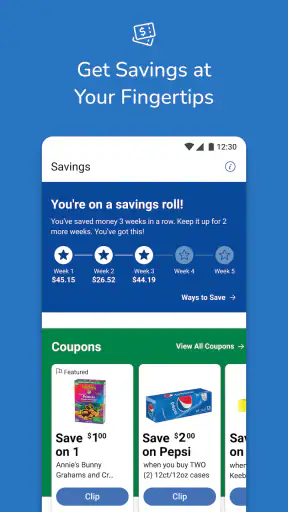
The savings side is the feature set most likely to attract regular users. Fred Meyer puts coupons, advertising, and rewards-related shopping tools in the same app, so I can look for opportunities before paying rather than relying entirely on memory. This is a strong reason to choose it over a generic list app if I regularly shop at Fred Meyer.
Still, I would not treat every advertised offer as an automatic bargain. A discount only helps when the product fits my needs, the quantity makes sense, and the final basket remains within budget. My preferred routine is to scan the advertising, save only offers connected to my list, and then stop browsing. That simple boundary keeps the savings tools useful instead of distracting.
Rewards are another reason to make the app part of a regular routine rather than a one-time download. If I shop at Fred Meyer occasionally, I may forget to check for relevant savings before leaving home. If I shop there often, opening the app during list preparation becomes a natural reminder. The benefit comes from consistency: checking before the trip, not trying to reconstruct missed opportunities afterward.
One limitation is that the app is closely tied to the Fred Meyer shopping experience. That focus is a strength for loyal customers, but it is also the reason I would not recommend it as a general-purpose grocery organizer. Someone who compares several supermarket chains may prefer an independent list and budgeting app, because those tools are less connected to one retailer. Fred Meyer is better when the store itself is already part of the plan.
I also appreciate that the app can support a deliberate shopping style. I can use the list for necessities, the advertising for planning, and rewards tools for checking whether a planned purchase has an advantage. Used that way, the app helps me make decisions earlier, when I have time to think, instead of encouraging hurried choices at the shelf.
A realistic weekly scenario
Imagine that I am planning a weekend grocery trip for a household that needs breakfast food, vegetables, dinner ingredients, laundry supplies, and a few personal-care products. I start by checking the kitchen and writing the full list in Fred Meyer. I then look through the advertising and coupons, but I save or prioritize only the offers that match items already on my list.
Before leaving, I use the store-finding feature if I am not going to my normal location. I review the list once more, remove anything that has been covered by another purchase, and mark the items that are essential. In the store, I use the list as a checklist rather than repeatedly opening promotional pages. That keeps my attention on the shopping itself.
If I notice a tempting offer for something absent from the list, I ask whether it replaces a planned purchase or simply adds to the basket. This is where the app’s convenience needs a little discipline. The same promotional access that can help me reduce the cost of planned shopping can also make an unplanned purchase feel justified.
After the trip, the list gives me a useful starting point for the next visit. I can remember which items were genuinely recurring and which were one-off purchases. That turns the app into a lightweight planning habit rather than a tool I open only when I am already late.
Stability, recovery, and everyday reliability
The app’s long presence in the stores and its current version suggest an actively maintained shopping product, but I judge reliability by how well it supports a trip when something goes wrong. The most important recovery habit is simple: prepare the list and review savings before leaving. If a page takes longer than expected to load or I need to reopen a section, the core shopping plan should still be clear in my head.
I would also avoid making the app my only memory aid for a time-sensitive trip. A short mental note of the most important items is sensible, especially when shopping in a hurry. This is not a criticism unique to Fred Meyer; retailer apps combine live shopping content with personal planning, and the live parts can be more demanding than a basic note.
For routine use, the app feels more dependable when I keep the workflow narrow. I open it to prepare, check the relevant offers, confirm the store, and use the list. Constantly jumping between every available section creates more opportunities for confusion than following a fixed sequence. In my experience, a consistent routine is one of the best ways to make a feature-rich retail app feel stable.
The 3.9 average rating is worth considering before installing. It is not a reason to dismiss the app, especially for a regular Fred Meyer shopper, but it does tell me to keep expectations realistic. Retail apps can be useful while still having moments of friction, particularly when a user wants a very fast, minimal interface. I would install it for the store-specific benefits, not because I expect a perfect experience on every device.
Older phones, storage, and practical device limits
Fred Meyer supports Android 8.0 and later, so it is available to people using older compatible phones as well as newer models. That broad compatibility is helpful, but compatibility alone does not guarantee identical performance across devices. A newer phone may feel more comfortable when switching between the list, store information, and promotional content, while an older device may make those transitions feel less immediate.
Resource demands matter most during a full shopping session. A basic list should be a lighter task than browsing several content-heavy sections, so I would prepare the complicated parts before leaving home. Closing unrelated apps can also make sense on an older phone, not because Fred Meyer is necessarily unusually demanding, but because every extra background task can make a shopping trip feel less responsive.
Screen size affects usability too. On a compact phone, a long list may require more scrolling, and that can be frustrating when I am trying to keep track of several categories. On a larger display, reviewing the list and promotional information is more comfortable. If I often shop with one hand, I would keep the list concise and organized rather than relying on repeated scrolling.
Storage is another practical consideration for any frequently updated retailer app. I would keep the phone’s available space reasonably clear and install updates when convenient, especially if I depend on the app for regular trips. The goal is not to turn shopping into device maintenance; it is simply to avoid discovering that the phone has little room left when I need the app.
People with very limited data access should prepare more carefully. Store-finding, advertising, coupon, and rewards content are most useful when current information can load, while a prewritten list remains valuable even if I decide not to browse further. Anyone who wants a completely offline shopping tool may be happier with a basic notes app, accepting that it will not provide Fred Meyer’s retailer-specific savings workflow.
Who should use it, and who should choose something else?
I would recommend Fred Meyer to regular Fred Meyer shoppers who want one place for a shopping list, store discovery, advertising, coupons, and rewards-related planning. It is especially suitable for people who prepare weekly trips in advance and are willing to spend a few minutes checking offers before shopping. Families can also benefit from the list as a shared reference point for recurring household purchases.
I would be more cautious about recommending it to someone who shops at many different chains, dislikes promotional browsing, or wants the simplest possible checklist. A neutral notes app is faster for writing down a few items. A dedicated budgeting tool may be better for tracking spending across retailers. A general grocery-list app may also be preferable if the main goal is organizing products by aisle without retailer-specific content.
There is another important distinction: shoppers who already use Fred Meyer frequently will probably get more value than occasional visitors. The more often I prepare trips, check savings, and use the store-finding feature, the more the combined design earns its place on my phone. For a rare visit, the setup may feel like more effort than the trip deserves.
The free price removes the biggest barrier to trying it, and the Everyone age rating makes it broadly approachable. Even so, free does not mean frictionless. The app asks me to spend attention on retailer content, and that is worthwhile only when I actually shop at the associated stores. The right question is not whether it has many tools, but whether those tools match my shopping habits.
My final performance verdict
Fred Meyer is a practical shopping app with a clear retailer-specific purpose. I find its best performance comes from preparation: build the list at home, check relevant savings, confirm the store, and use the list as the main in-store screen. That workflow keeps the app focused and reduces the impact of slower or more involved moments during heavier use.
Its strongest advantage over a normal notes app is the connection between planning and Fred Meyer’s shopping ecosystem. Its biggest weakness is the same connection: people who want a neutral, ultra-light list may find the broader shopping content unnecessary. The app suits a regular customer much better than a casual visitor or a shopper who moves constantly between competing retailers.
With a current version of 97.2, support for Android 8.0 and later, and a free installation, Fred Meyer is easy to try without committing money. I would use it when the store is part of my normal routine, especially for larger weekly shops where coupons, advertising, rewards, and a prepared list can work together. I would skip it when I only need a tiny offline checklist.
My recommendation is therefore positive but specific: install Fred Meyer if you shop at Fred Meyer often and want to make savings and preparation part of the same routine. Give yourself a few minutes before each trip, organize the list around real needs, and resist browsing every offer just because it appears. Used with that discipline, it becomes a useful everyday assistant rather than another app competing for attention.


